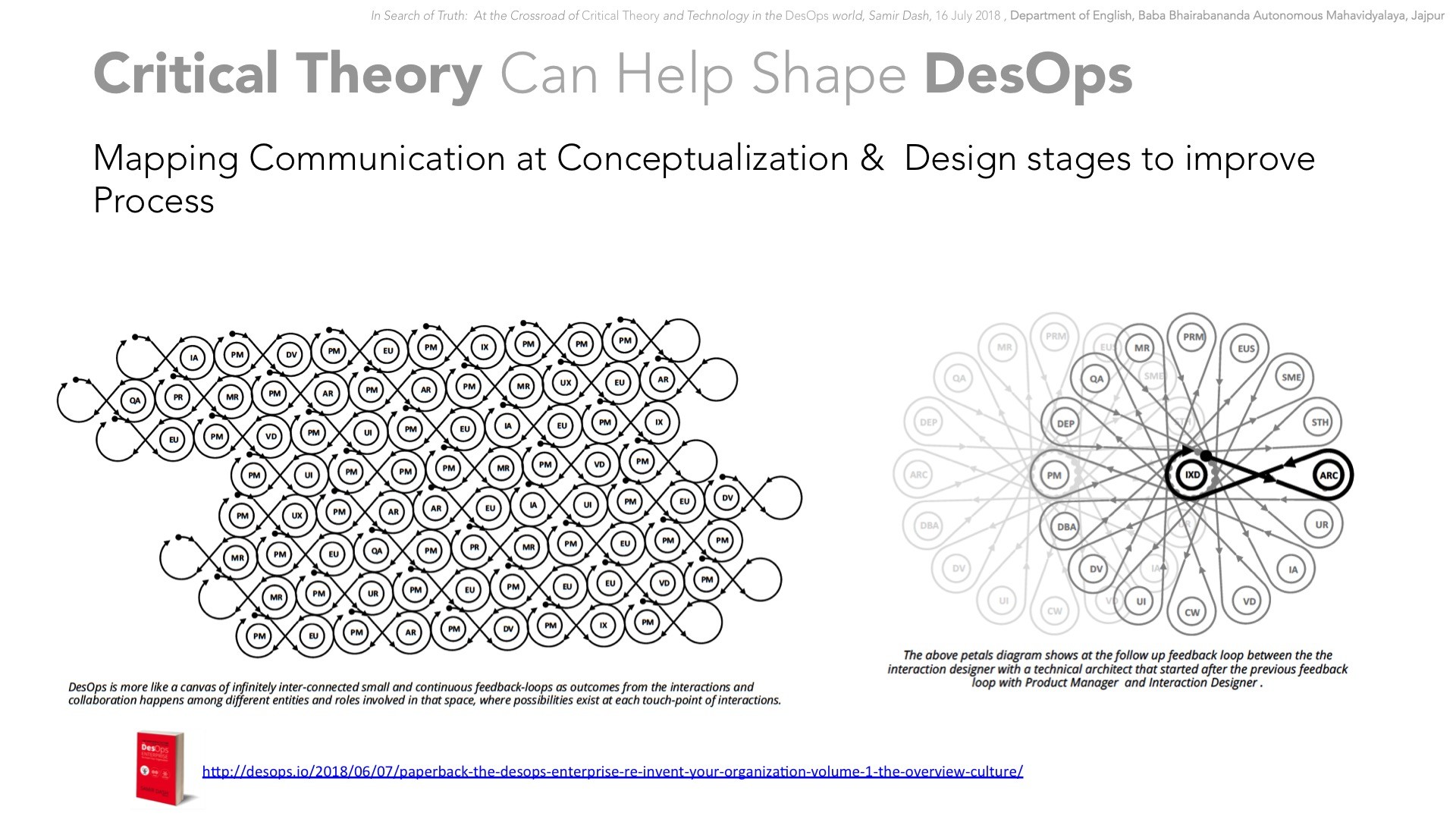
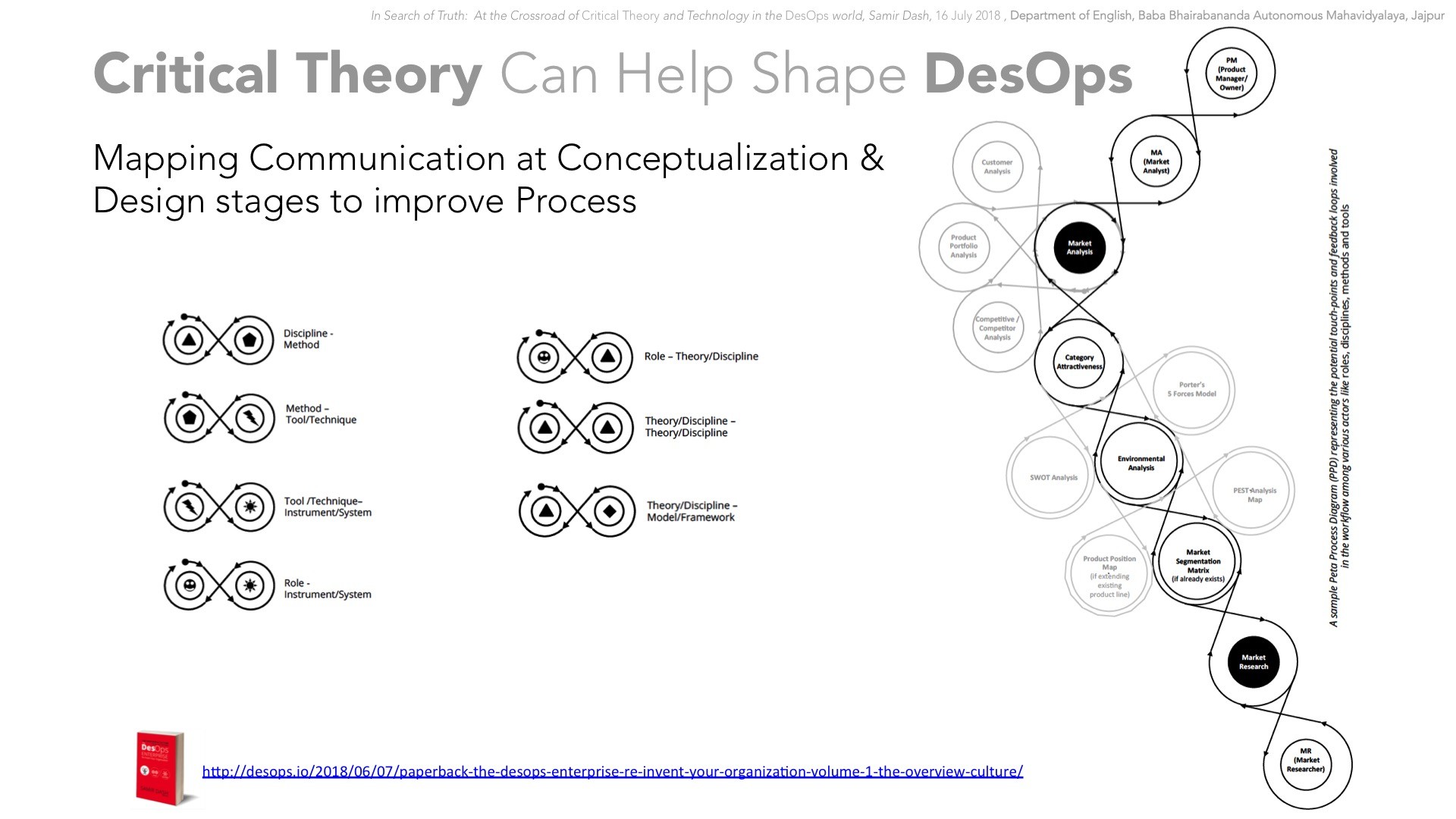
SIMPLE: Digital Content Distribution from Cloud (Proof of Concept)

This is one of my proof of concept application demo on how to prepare an eco-system for delivering protected digital content specially related to e-learning and m-learning context.

SIMPLE is an eco-system that allows tools such as

SimpleAuthor : That allows content authoring from common formats such as MS Office documents , PDFs and CBRs along with the options to author contents using cloud based WYSIWYG editor .

SimplePublisher: This allows you to import contents such as set of HTML files, ePubs, PDFs, text files, set of images, CBR files and the output from SimpleAuthor

SimplePlayer: This is a native course packaged with the required run-time that the end user will be using to view the content . This allows content activation and offline content tracking . In this current demo the Player is an EXE file that is being generated from the SimplePublisher. In the POC of the Publisher, each course is generated as an EXE file containing the content and the required runtime in it.

SimpleStore: In this POC you can see it as an online store that show cases different titles published using SimplePublisher. Basically it manages the catalog, and tracks activation of each offline course.

Note: the SIMPLE eco-system can be seen as an experiment based on the CUPID (Common Unified Programs for Instruction Delivery) guidelines. Check CUPID related info here:

OR at

http://cupid.mobilewish.com/

Socio-cultural User Experience (SX) and Social Interaction Design (SxD): The Socio-cultural Context in UX and Usability Design

Summary

This paper introduces the ‘socio-cultural’ dimension of User Experience (UX) and Interaction Design (IxD) with reference to emerging devices and related eco-systems.

Background

With the emergence of Google Glass, the topics related to devices infringing with personal privacy became hot cakes for tech-debates. Many social scientists, human rights activists have started to see the ‘Glass’ as the evil that reminds them with George Orwell’s ‘1984’. The fear of a ‘Google Big Brother’ controlling the major shares of the information world is seen as the intruder to private aspects of ‘the public’.

Fig1: The backlashes on Google glass has become one of the major discussion in recent tech world.
Example link: http://blogs.computerworld.com/privacy/22144/hey-dont-wink-me-glasshole-itbwcw

It is not the case that Google has not spent money on user research and usability aspects before going ahead with the concept of persons using glass that may change the way we interact with systems in our daily life. Usability wise, it is definitely a super gadget that has the potential to  catapult the device industry into next century. But the new features and interaction methods implemented in the device in a manner that is actually a decade old approach that is only fit for human-computer-interaction (HCI) in case of smart phones and tablets which have less tendency to hurt sentiments of those who do not directly interact with the device when the user might be performing some actions in a certain socio-cultural context. These sentiments could result in the fear of losing privacy , cultural distrust and humiliation among the second-hand users of the  device who are impacted indirectly in some way by the device actions in the context.

There is an interesting article on web titled “7 Innocent Gestures That Can Get You Killed Overseas”  that gives nice examples of various innocent gestures in daily life a  person can actually get him into trouble in a different socio-cultural context http://www.cracked.com/article_16335_7-innocent-gestures-that-can-get-you-killed-overseas.html.

Therefore it is high time to rethink in UX domain to discover the missing pieces which we think we have already discovered.

Socio-Cultural User Experience (SX) – the missing piece in UX

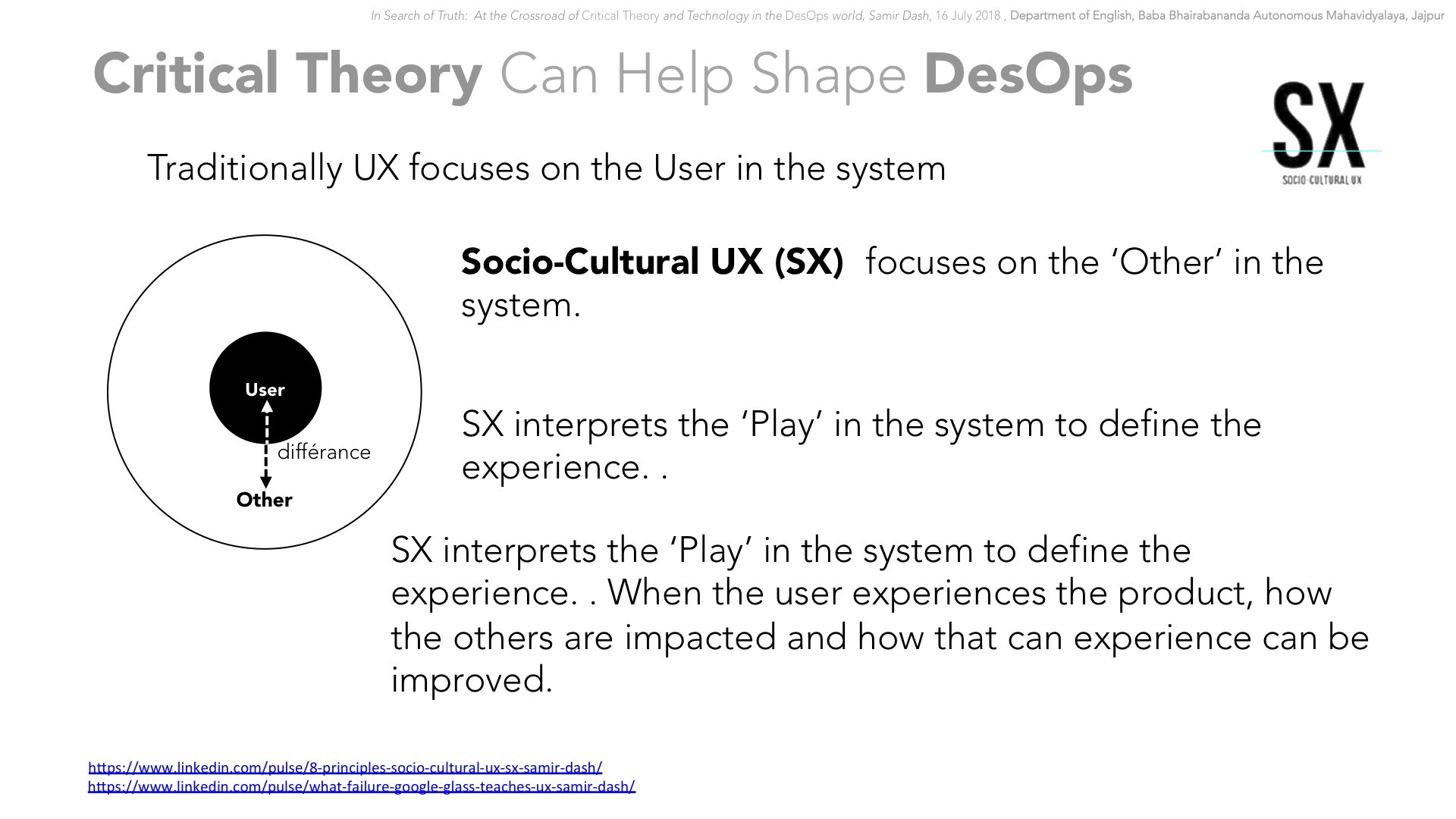
I have coined the term ‘SX’ aka ‘Socio-Cultural User Experience’ to represent the aspect of Usability Design or User Experience (UX) that deals with usability aspect of products/ software in a social context.

 SX

Fig2: The UX model is incomplete without its ‘social’ context.
To make usability design meaningful the model must follow the social context


Social and Cultural aspect of UX can be interpreted as a new component of UX – it is the missing piece that makes UX meaningful in social context.

Traditional UX model is centered around human user. But the critical factor that makes human being differentiated from other beings is his ability to ‘evolve and follow social standards’. The history of human growth is actually more clearly represented in the “history of human civilization”. So any product design must adhere to the social factor of design  and this is what SX is all about.

Considering the ‘Others’ in the User’s Social circle

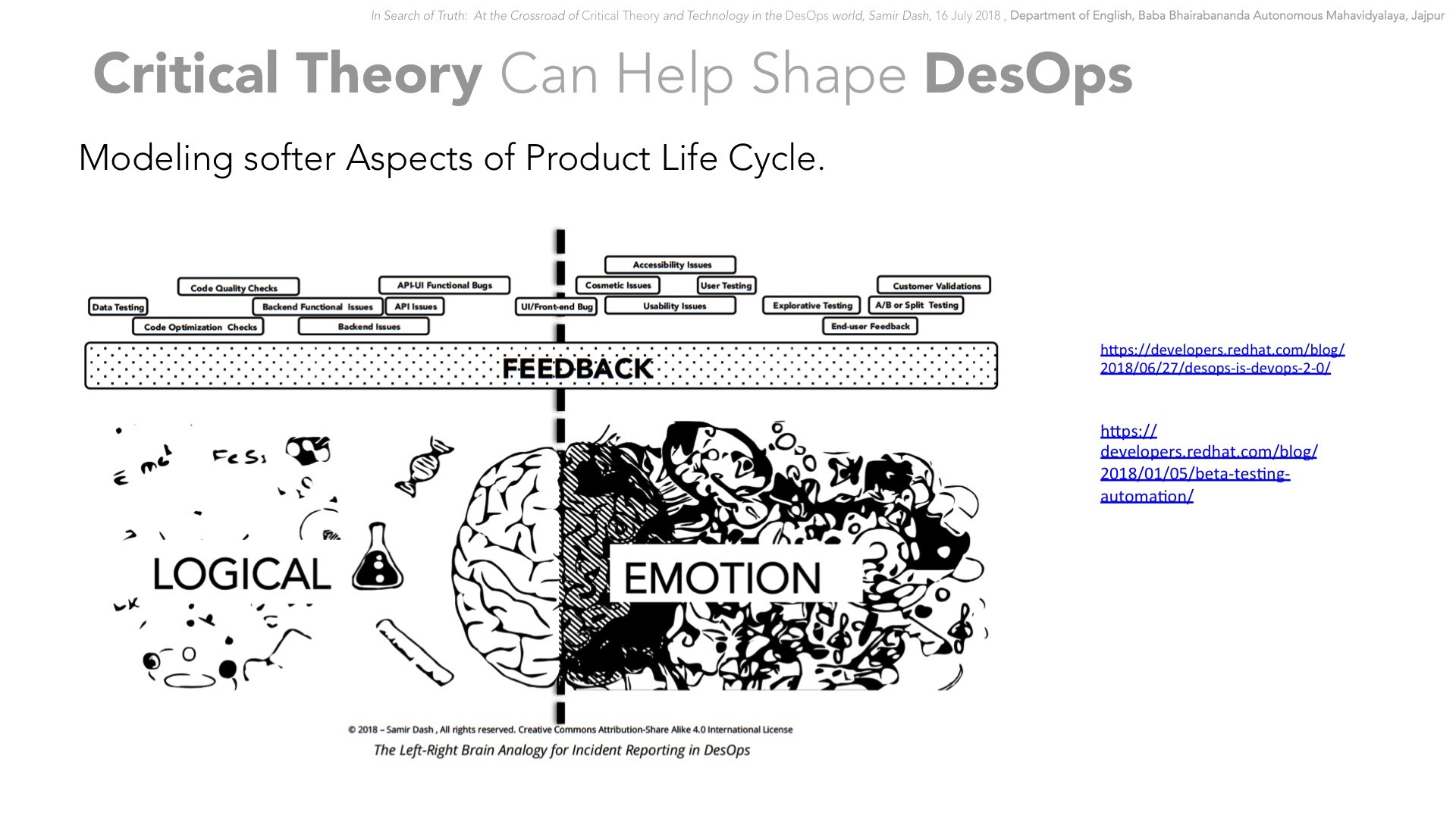
The existing UX model does not analyze the need beyond the current user and his ‘type’ to do a usability test  — it never considers how it is impacting the other members of the society while the target user set is using the app/system.

For example, using car horn is a safety measure, but using it near a hospital or school is considered as unsocial and disturbing. There are many social check points that bar users of any system from using it in special socio logical context.


Fig3 : The no horn , camera, mobile phones and similar sign posts can be seen as a few of the social guidelines represented graphically on the use of different systems.

So implementing social context related restrictive design is even though new , is actually a age old tradition.

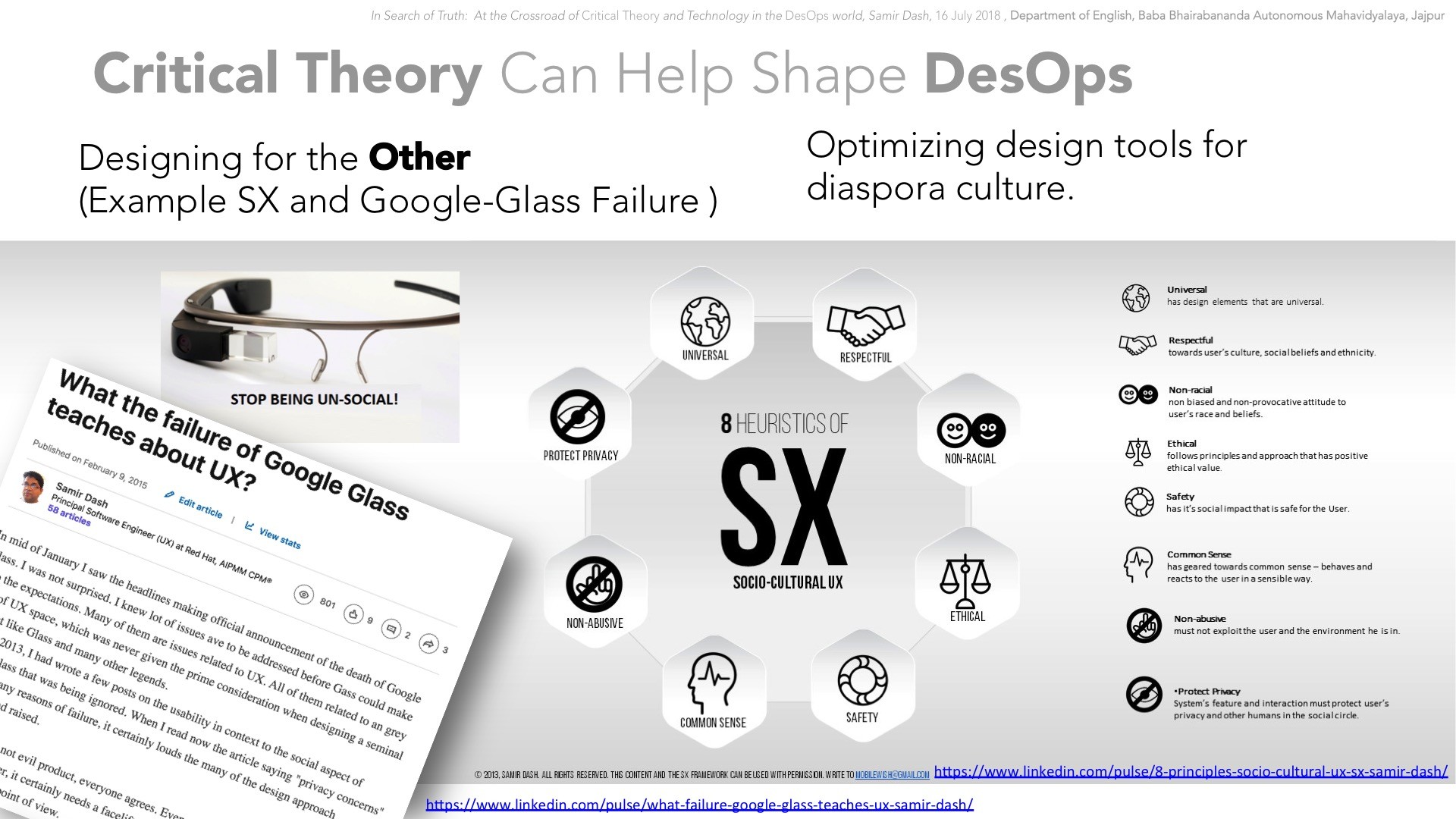
Criteria of a Good ‘SX’ Compatible System

Criteria of a sound usability design of an app on socio-cultural context:

  1. Universal—has design elements that are universal.
  2. Ethical – follows principles and approach that has positive ethical value
  3. Non-racial – non biased and non-provocative attitude to user’s race and beliefs.
  4. Respectful – towards user’s culture, social beliefs and ethnicity
  5. Safety – has it’s social impact that is safe for the User.
  6. Non-abusive – must not exploit the user and the environment he is in .
  7. Common Sense – has geared towards common sense – behaves and reacts to the user in a sensible way
  8. Protect Privacy – App’s feature and interaction must protect user’s privacy and other humans in the social circle.

Example of a Possible Enhancements to a Real Life Product via ‘SX’ :

Fig4 : Google Glass has an inbuilt camera that can take pictures.  

Let’s take the case of Google Glass.

Google Glass is designed in a way that can act as more personal than a mobile handset, as it is a spectacle and can be indispensable   accessory for the user once he gets addicted to it by replacing his conventional glass with it.

But the support for camera to take picture can pose a problem for the user to enter private areas, industrial areas, secure zones and offices where cameras are not allowed. In some places of earth, the cultural restrictions are in practice to ban cameras in certain places — most of the temples in India do not allow cameras inside. Now imagine, if the user has replaced his traditional spectacle for it , then he may find it difficult to manage without it in these scenarios.

So by following SX approach in usability design, the glass will require to have a “detachable set of camera” used in the glass so that the user can detach the camera and which would power it off and at the same time allow the user to keep on using the glass as a conventional spectacle.

This example may be just one of many features that Google glass might have, but it is enough to illustrate the approach in thought.

Social Interaction Design (SxD) – Helping IxD to Focus on Context and Environment of the User

I am using the term ‘SxD’ aka ‘Social Interaction Design’ that deals with the ‘social aspect’ of Human – Computer – Interaction (HCI) and Interaction Design (IxD) that  focuses on usability design in context of how the user is interactive with the app in specific socio-cultural context.

Points to Focus on while designing a SxD Compatible System

  1. Provide multiple alternatives to the interaction methods to control the same functionalities in different socio-cultural context.
  2. User should have total control over enable/disable of interaction methods for different scenarios.
  3. The default interaction method must follow ‘SX’ approach.
  4. Provide options to the user to switch between interaction methods with the system as and when needed.
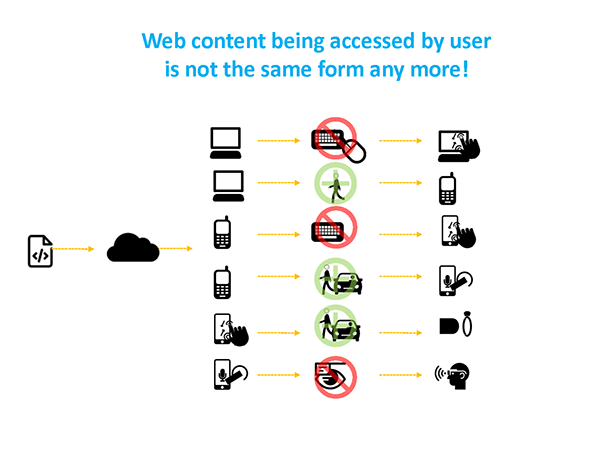
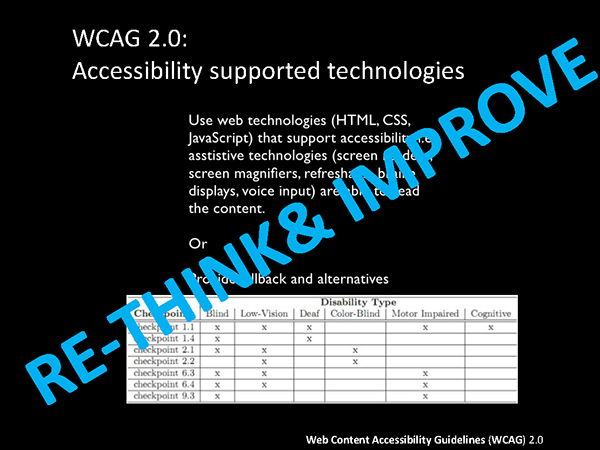
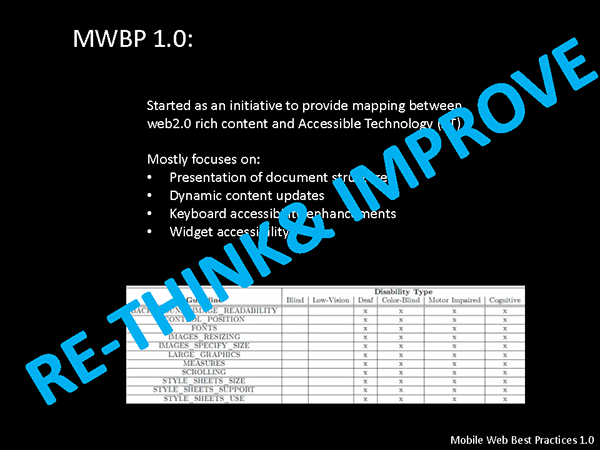
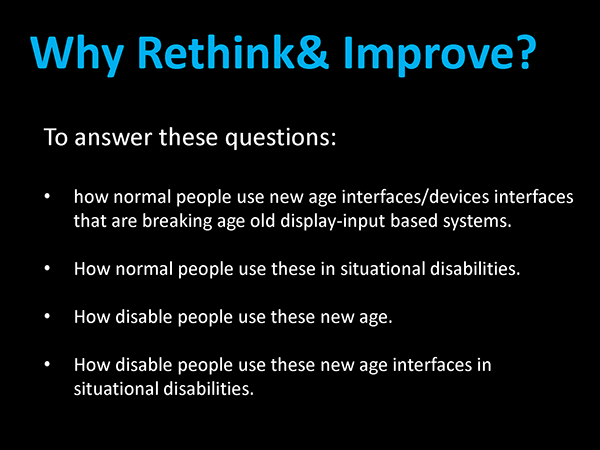
  1. Alternative mechanisms should be provided for physically challenged users. Rethink on the use of gestures and other interaction methods in the Article 508 context as everyday the new devices with unpredictable (not necessarily negative!) interaction methods and features.

Gesture and other Interaction Medium of SxD:

The ‘Social Interaction Design’ approach has the following major facets in the  system interaction towards the user in socio-usability context:

  1. Facial Gestures—The selection of Human triggered facial gestures (e.g. wink, smile etc.) to activate the system or trigger any action in the system must be judged based on the canonical meaning of those gestures in social and cultural context of the user where he is going to use it.  For example, in case of Google Glass , the feature of “winking” (the gesture developed by Google Glass developer Mike DiGiovanni http://news.cnet.com/8301-1023_3-57582500-93/google-glass-code-lets-you-snap-a-photo-with-a-wink/  ) at someone to take a photo can pose a problem if the user is in India or Middle East countries. Even in western world winking at a lady or group of ladies (even though it is unintentional for any kind of abasement) can be taken as a negative action (e.g. weakness in character) and evoke anger and misunderstanding. So even if the winking to take a feature is a ‘cool feature’, in social context SxD will suggest the usability/interaction engineer to rethink on it to implement some options to ‘keep it disabled’ by default and allow the user the total freedom to use his judgment to enable and use the feature in any given socio-cultural context.Fig5: The ‘wink’ gesture developed by Google Glass developer Mike DiGiovann allows user to take a snap of the surrounding with just a wink of an eye.


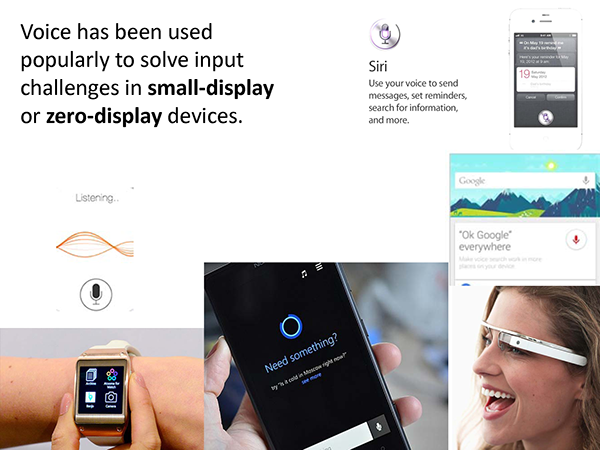
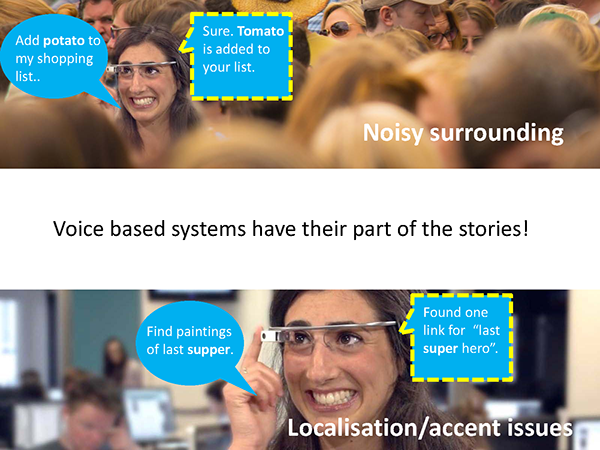
  2. Sound Gestures –  The selection of sound gestures – the use of voice or sound pattern to control the system should be examined for different user environments. For example blowing a whistle to activate a play functionality on a portable music player, or to open an SMS on the cell phone can be an interesting feature, but on the other hand if it becomes useless in a busy street or in a meeting room where a discussion is going on.
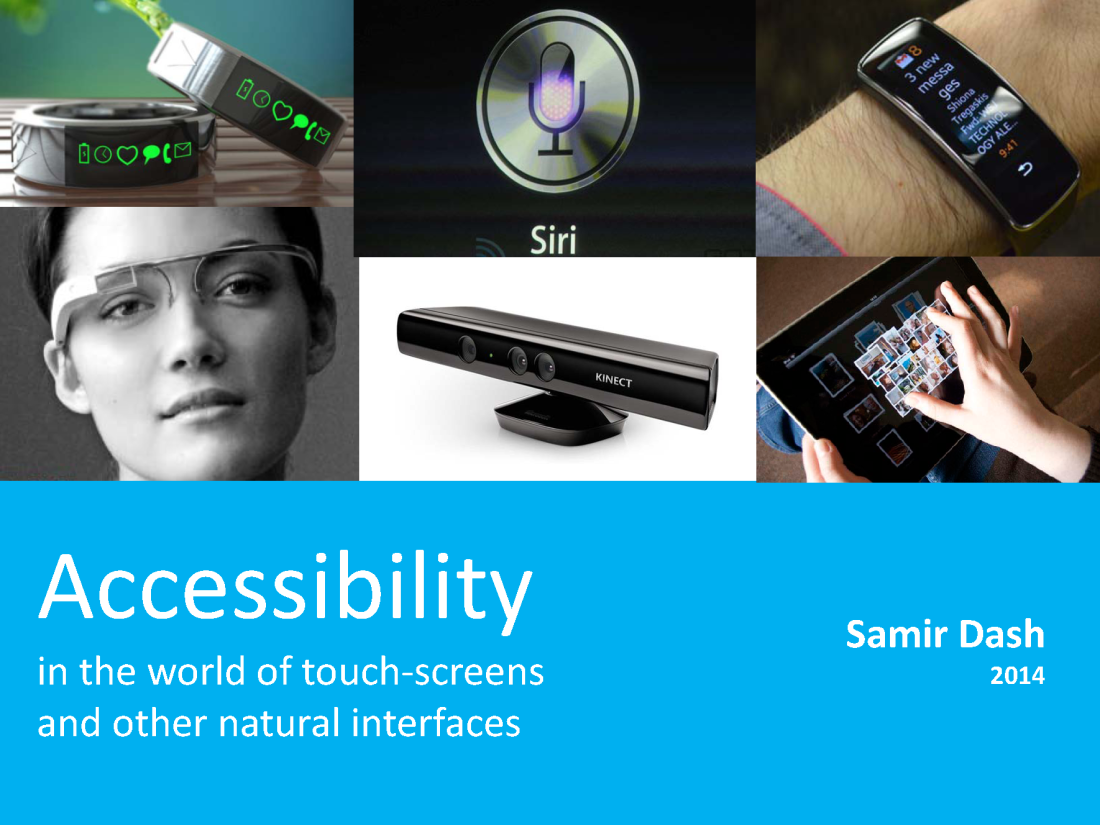
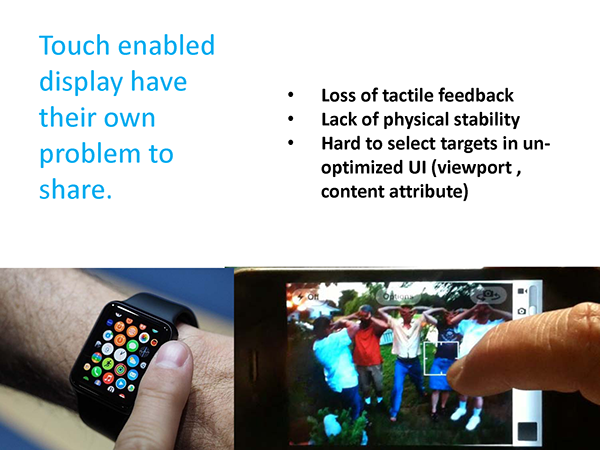
  3. Touch based Gestures -   Touch, swipe and pinch are popular now a days as most of the tablets and smartphones offer this as a user friendly interaction method for the user. More devices are coming up which do not have any physical button rather a few multi-touch gestures are enough to fully control them. However ‘SxD’ stresses that the devices must be designed and developed with the interaction method that can allow alternative to the available touch triggered interaction mechanism.  For example , while developing a digital medical instrument with touch sensitive display, the interaction methods  should be carefully planned so that the surgeon can use the system without touching to avoid infections through contact with it while conducting any mission critical surgery.
  1. Hand/Finger based 3D gestures – ‘SxD’ approach encourages to conduct a social analysis of the  hand/finger based gestures that are planned to be used in a system – the gestures should selected / innovated by carefully studying the cultural context avoiding common gestures used in daily life that are considered abusive to others. In addition to this practical usage resulting out of user’s environment and work culture must be given consideration. For example the middle finger gesture commonly used by youths to represent the crack humiliating pun on the other should not be used for any app that is expected to be popular among the users from the similar demography. But note that only considering the demography is not enough to decide the gestures.
  1. Mouse /Keyboard Control – Similar to the gesture , voice and the related interaction method with system, mouse, keyboard, joystick and other typical input device based methods should be considered with in the context in which they are going to be used. As this group of interaction method are very old, many standard guidelines are already in there in practice. They However we need to rethink on them and make sure they are upto date with the ever changing human –computer-interaction domain.

Going Forward

Understanding usability is the first step in developing a successful system/software. However we need to understand the social and cultural implications of the UX implementations of the definitions of usability which we think is good for the user in order to   make our software truly complete and meaningful in all aspect. ‘SX’ and ‘SxD’ are the two missing pieces of this whole puzzle, which we need to discover in order to rediscover UX.


Download the paper from Slideshare :

http://www.slideshare.net/MobileWish/sx-overview


cupQ (v 0.2) – with support for Plugins/Extensions

What’s new in this version 0.2 :

  1. Added support for plugin architecture. Now extending cupQ is also everybody’s cup of tea!Anyone can now create plugins for cupQ to add powerful features.
  2. Disabled auto initialisation of browser detection, which was there in v 0.1. Now the developer has to initialise it manually if required.
  3. Now each cupQ object instance is created, it will have an unique ID, which will appear in trace(), that will allow developers to easily track the target instance from debug information from the console .
  4. cupQ initiation method now by default does not return the result array of nodes list . The init() method now returns the cupQ object. This is a major change.
  5. For nodes List we can now use cupQ property “nodesArray” (e.g. _().init().nodesArray )or a new method called “getNodesArray()” (e.g. _().init().getNodesArray() or _().getNodesArray() )

Using cupQ: User Guide (v0.2)


cupQ” (aka “cupQuery”)is an easy-to-use cross-browser open source JavaScript framework that allows querying and manipulation of HTML DOM document using standard selectors to get output as an array of result values. With cupQ, controlling HTML DOM is now everybody’s cup of tea!

Author: Samir Dash, mobilewish@gmail.com :: http://samirshomepage.wordpress.com ** **Download:https://github.com/mobilewish/cupQ License: MIT License. Version: 0.2 Published: June 2012


What’s new in this version?

  1. Added support for plugin architecture. Now extending cupQ is also everybody’s cup of tea!Anyone can now create plugins for cupQ to add powerful features.
  2. Disabled auto initialisation of browser detection, which was there in v 0.1. Now the developer has to initialise it manually if required.
  3. Now each cupQ object instance is created, it will have an unique ID, which will appear in trace(), that will allow developers to easily track the target instance from debug information from the console .
  4. cupQ initiation method now by default does not return the result array of nodes list . The init() method now returns the cupQ object. This is a major change.
  5. For nodes List we can now use cupQ property “nodesArray” (e.g. _().init().nodesArray )or a new method called “getNodesArray()” (e.g. _().init().getNodesArray() or _().getNodesArray() ) ***

USAGE – OVERVIEW:

Any cupQ method always returns results in a form of an array. So to track any individual values of the result you can always use index to specify the resulting item in the result array.

The cupQ object can be initiated using the “_()”.

Sample usage can be : _().setDebug(true);

Instead of directly using “_()”, you can assign a variable to it so that you can refer to the same cupQ object multiple times — this helps in avoiding multiple instance of the cupQ object. So the previous example can be written as

var myCupQ = _(); myCupQ.setDebug(true); 

Querying HTML DOM can only be done after the document is ready. So after basic setup like allowing debug mode or the similar, the on document ready event can be setup as follows:

var myCupQ = _(); myCupQ.onDocumentReady= function (){ //add your code here that you want to load after dom is loaded or the document is ready...for example the following line is called after the document is ready myCupQ.importFiles(["js/importscripts.js"]); //here you can use multiple cupQ objects ..like the one in the following is a different one that the previous line _().importFiles(["js/importMyNewScripts.js"]); } 

USAGE – QUERYING DOM USING SELECTORS:

For querying dom the expression involves 3 parameters .

 _(selector, targetNode, indexQueryResultingArray).init().getNodesArray(); "selector" is a string which can be a class name, an element id or simply a tag name. For class name the "selector" must be prefixed with a dot "." and for an id there must be a prefix of a hash "#" "targetNode" can be document or any DOM node or an array with nodes. This is optional (but in case the third parameter is "indexQueryResultingArray" is specified , you need to specify this one). If no value is supplied, the querying starts with the document object element of the DOM. "indexQueryResultingArray" is either a zero (0) based index number, or an array of numbers or a string with expression or a function that can be passed that can target which node or nodes to pick if the query results in a list of nodes or a collection of DOM elements. Using 0 is the first item in the resulting nodes list, and using -1 will refer to the last item in the resulting array if applicable. This parameter is optional. To get query output as an array of resulting nodes, the "getNodesArray()" is called for the target cupQ object. examples : option: 1 (as a method call) var myCupQ = _("p").init(); myCupQ.getNodesArray(); //returns array of resulting nodes or simply use _("p").init().getNodesArray(); //returns array of resulting nodes option 2 (as a property) var myCupQ = _("p").init(); myCupQ.nodesArray; //returns array of resulting nodes or simply use _("p").init().nodesArray; //returns array of resulting nodes 

In the following are different types of usage of selectors to get the array of resulting nodes from the DOM:

Get array of nodes having the class name. For example for a class name "className" the expression will be as follows: _(".className").init().getNodesArray(); Get current node as an element of an array with the id name. For example for a id name "idName" the expression will be as follows: _(".idName").init().getNodesArray(); Get the first node as an element of an array with the specified class name. _(".className", document, 0).init().getNodesArray(); Get the last node as an element of an array with the specified class name _(".className", document, -1).init().getNodesArray(); Get array of nodes with the class names appearing with odd positions -- here the expression "odd" is used as 3rd parameter. _(".className", document, "odd").init().getNodesArray(); Get array of nodes with the specified class names appearing with even positions -- here the expression "even" is used as 3rd parameter. _(".className", document, "even").init().getNodesArray(); Get array of nodes with the specified class names appearing with positions mentioned in the array-- here the array of index numbers is used as 3rd parameter.. Note the array contains indexes that are 0 based. _(".className", document, [1, 2, 4, 5]).init().getNodesArray(); Get array of nodes with the class names appearing with positions as per the expression i.e. position numbers > 4 in this example. Note the expression contains index that is 0 based. _(".className", document, ">4").init().getNodesArray(); Get array of nodes with the class names appearing with positions as per the expression i.e. position numbers == 4 in this example. Note the expression contains index that is 0 based. _(".className", document, "==4").init().getNodesArray(); Get array of nodes with the class names appearing with positions as per the expression i.e. position numbers < 4 in this example. Note the expression contains index that is 0 based. _(".className", document, "<4").init().getNodesArray(); Get array of nodes with the class names appearing with positions as per the expression i.e. position numbers >= 4 in this example. Note the expression contains index that is 0 based. _(".className", document, ">=4").init().getNodesArray(); Get array of nodes with the class names appearing with positions as per the expression i.e. position numbers <= 4 in this example. Note the expression contains index that is 0 based. _(".className", document, "<=4").init().getNodesArray(); Get array of nodes with the class names appearing with positions as per the out put based on the function "myFunction" ...like you can use a function that compares certain things to decide which nodes to choose. _(".className", document, myFunction).init().getNodesArray(); where myFunction = function (){ return [3, 5, 9]; } 

USAGE – GETTING THE PARENT NODE OR CHILD NODES OF THE PROVIDED SELECTORS:

Getting array of parent and child nodes from document after querying using the specified selector. This includes [objectText] if there is no nodes present but some text present. For example in side paragraph only text is there.

Get the array containing unique parent node of resulting nodes after querying using the specified selector (for example here the class name is used ) _("-.className", document, -1); Get the array of child nodes of resulting nodes after querying using the specified selector (for example here the class name is used ) _("+.className", document, -1); 

USAGE – QUERYING DOM USING SEQUENCE/TREE OF SELECTORS:

There is a nice feature of cupQ that allows you to provide a string of sequence/tree of selectors (excluding the document object element) to get the resulting node. Each selector has to be separated by a single blank space .

Parent and child nodes expressions can also be used :

Example: (_("p[1] span[0]").init().getNodesArray());//sequence of selectors (_("-p[1] span[0]").init().getNodesArray());//parent of sequence of selectors (_("+p[1]").init().getNodesArray());//array of children of sequence of selectors 

USAGE – QUERYING DOM FROM CUSTOM NODE ON WARDS:

By default, the cupQ starts Querying the HTML DOM from the root or the ‘document’ object element. But this can be customised to start querying from any specific node of the DOM by supplying “targetNode” which can be document or any DOM node or an array with nodes.
Example of getting nodes from custom node

var targetNode = document.getElementById("myId"); Note: instead of using DOM methods above, you can even use cupQ to get the targetNode e.g. _("#myId").init(); _(".idName", targetNode);//get current node with the id name from the target Node onwards _(".className", targetNode);//get array of nodes from the target Node onwards with the class name _(".className", targetNode, 0);//get first node from the target Node onwards with the class name _(".className", targetNode, -1);//get last node from the target Node onwards with the class name 

Example of getting nodes (arrays) from an array containing custom nodes

var targetNode = [document.getElementById("myId"),document.getElementById("myId2") ]; Note: instead of using DOM methods above, you can even use cupQ to get the targetNode e.g. [_("#myId").init(), _("#myId2").init()]; _(".idName", targetNodesList);//get current nodes (array) with the id name from the target NodesLists onwards _(".className", targetNodesList);//get array of nodes from the target NodesLists onwards with the class name _(".className", targetNodesList, 0);//get first node from the target NodesLists onwards with the class name _(".className", targetNodesList, -1);//get last node from the target NodesLists onwards with the class name 

USAGE – QUERYING AND MANIPULATING HTML DOM:

Using cupQ, You can do lot more than just querying HTML DOM to get array of nodes or HTML elements. You can use getter / setters to target and manipulate different nodes and their attributes, styles, html and text contents.

.html(val, index) ------------------ This is a both getter and setter to grab and manipulate the innerHTML of the target node(s). If no parameter is supplied, the method acts as a getter and returns the innerHTML of the target node(s) as an array. If parameter "val" is supplied then the value is set to the innerHTML of the target node(s). If index is supplied, then only the target node with thye specified index in the array of the reulting nodes is modified or the value is granbbed from. e.g: _("#idName").html();//get inner html _("#idName").html("<b>hello</b>");//update inner html _("p").html("hello", 0);//update inner html for the 0 indexed paragraph among the resulting array of paragraphs obtained after the query is executed. .htmlAppend(val, index) ------------------------- This is a setter method (which also returns the final updated inner html )that appends (adds content at the end of existing one) the provided content (via the "val" parameter) and also can work on specific indexed item in the resulting nodes. e.g: _("-p").htmlAppend("<b>hello</b>", 1);//appends to inner html .htmlPrepend(val, index) ------------------------- This is a setter method (which also returns the final updated inner html )that pre-pends (adds content at the begining of existing one) the provided content (via the "val" parameter) and also can work on specific indexed item in the resulting nodes. e.g: _("-p").htmlPrepend("<b>hello</b>", 1);//prepends to inner html .text(val, index) ------------------ This is a both getter and setter to grab and manipulate the inner text (innerText) of the target node(s). If no parameter is supplied, the method acts as a getter and returns the inner text of the target node(s) as an array. If parameter "val" is supplied then the value is set to the inner text of the target node(s). If index is supplied, then only the target node with thye specified index in the array of the reulting nodes is modified or the value is granbbed from. e.g: _("#idName").text();//get inner text _("#idName").text("hello");//update inner text _("p").text("hello", 0);//update inner text for the 0 indexed paragraph among the resulting array of paragraphs obtained after the query is executed. .textAppend(val, index) ------------------------- This is a setter method (which also returns the final updated inner text )that appends (adds content at the end of existing one) the provided content (via the "val" parameter) and also can work on specific indexed item in the resulting nodes. e.g: _("-p").textAppend("<b>hello</b>", 1);//appends to inner text .textPrepend(val, index) ------------------------- This is a setter method (which also returns the final updated inner text )that pre-pends (adds content at the begining of existing one) the provided content (via the "val" parameter) and also can work on specific indexed item in the resulting nodes. e.g: _("-p").textPrepend("hello", 1);//prepends to inner text .remove(index) ------------------------- This is a setter method that removes the resulting nodes and returns blank array if no index is spplied. If index is supplied, it removes the target node selecting it from the resulting array of nodes and returns the updated array of resulting nodes. e.g: _("p").remove();//removes all the nodes _("p").remove(1);//removes node of the mentioned index .style() ------------------------- This returns the array of style objects for the target nodes selected after querying using the selctors. Each individual style object can be then accessed using native DOM methods to manipulate for both getter and setter related activities. e.g: _("p").style();//get array of style objects for the resulting nodes _("p").style()[2];//get the target style object for corresponding index from the array of style objects obtained from the resulting nodes ((_("p").style())[0]).width='2440px';//setting the individual style "width" for any target style object (_("p").style(0)[0].backgroundColor);//getting individual style for any target style object .attribute(attributeName, indexQueryResultingArray, attributeValue) ---------------------------------------------------------------------------- This can be both getter and setter to manipulate attributes of the target nodes. attributeName - this is the name of the attribute you want to grab or set the value for. indexQueryResultingArray - this is optional. supply an index number to target the node in the resulting array of nodes. If 3rd parameter is used and you do not want to supply index use "" which will set it to default. attributeValue - this is optional. If supplied, this value will be set to the target attribute. e.g: (_("p").attribute("name"));//getter - here the target attribute is "name" (_("p").attribute("style", "", "background:yellow"));//setter - without using any index (so that it affects all the nodes in the array )using setter for a attribute called "style" - alternative way to manipulate style of a node (_("p").attribute("style", 1, "background:yellow"));//setter - using index (so that it affects only target indexed node )using setter for a attribute called "style" - alternative way to manipulate style of a node .childIndexInParent(indexQueryResultingArray) ---------------------------------------------------------------------------- This is a getter that returns an array of index numbers for each ttarget nodes in their parent nodeList. If indexQueryResultingArray is supplied it returns only the index of the target node in it's parent nodeList. e.g: (_("p").childIndexInParent());//get index numbers of the nodes selected under their parent node; (_("p").childIndexInParent(2))//for specific selected node ..the child index number of it in it's parent node 

USAGE – PROPERTIES

.version - returns version number of cupQ library used. .currentObjectId - returns the unique instance object Id of the cupQ object. .Q - returns the query. .isClassName- returns true if the query provided is a class name. .isIdName- returns true if the query provided is for an element id in HTML DOM. .isTagName- returns true if the query provided is for a HTML tag name. .isGetParent- returns true if the query provided is for selecting the parent nodes (unique) for the target nodes based on current query. .isGetChildren- returns true if the query provided is for selecting the child nodes for target nodes based on current query. .isGetCurrent - returns true if the query provided is for selecting the target nodes based on current query. .nodesArray - returns the array of the resulting target nodes for the provided queries. .childIndexInParentArray - returns the array of parentNodes of the resulting target nodes for the provided queries. .attributeArray - returns the array of attribute values (of provided attribute name) content of the resulting target nodes for the provided queries. .styleArray - returns the array of style attribute values of the resulting target nodes for the provided queries. .innerTextArray - returns the array of text content of the resulting target nodes for the provided queries. .innerHTMLArray - returns the array of HTML content of the resulting target nodes for the provided queries. .targetArray - returns the array of target nodes which are used as the root nodes for multiple queries. .bodyFilesArray - returns the array of JavaScript / CSS file paths to be added in the body of the HTML DOM . .headFilesArray - returns the array of JavaScript / CSS file paths to be added at the header of the HTML DOM . .pluginsArray - returns the array of plugins resgitered with cupQ. 

USAGE – BROWSER SNIFFING:

The cupQ sniffs for the browser and opertaing system when an instance of cupQ runs. The sniffing details can be found from properties of “.hostObject” .
Before getting browser, navigator and OS details, the initialisation has top be done through calling init();

 e.g: var myCupQ = _(); //now initialising the hostObject. myCupQ.hostObject.init(); //now get the details myCupQ.hostObject.browser; myCupQ.hostObject.version; myCupQ.hostObject.OS; myCupQ.hostObject.navigator; myCupQ.hostObject.navigatorVendor; myCupQ.hostObject.userAgent; 

USAGE – UTILITIES:

There are a few utilities methods available.

.getUniqueArray(myArray) -------------------------- This returns an array with unique items from the supplied array of items. 

USAGE – SETTINGS AND DEVELOPER UTILITIES:

_().setDebug(val); ----------------- This is a global flag that either turns on the debug mode (to allow "trace" messages in the browser console.) -- if you set this in any instance it will affect all the instances of cupQ running in that document. The parameter can be true or false boolean value. The default is false. e.g: _().setDebug(true);//true sets global debug mode on. The debug value can be read through the property "debug" _().debug; // returns the value true or false _().trace(val); ----------------- This iallows you to log your message to console window of the browser. This only writes to console only if the debug value is set to true. This is an easy to maintain feature that you can use to log your JavaScript messages to console, as you can turn on or off it using the debug mode. Now each cupQ object instance is created, it will have an unique ID, which will appear in trace(), that will allow developers to easily track the target instance from debug information from the console . For example an out put will be like the following : "[CUPQID1340363887134000] cupQ: onDocumentReady() called." Using trace is straightforward: e.g: _().trace(message);//passing value of message to console _().trace("some message");// only if the debug mode is on it logs the message to console; 

USAGE – EXTENDING CUPQ OBJECT WITH PLUGINS – WRITING SAMPLE PLUGIN:

From v0.2 onwards the support for plugin has been added. Now extending cupQ is also everybody’s cup of tea!Anyone can now create plugins for cupQ to add powerful features.

To add a plugin, the plugin object is passed to cupQ instance via “register” method of the “pluginManager” object of cupQ.

Any plugin resgitered with any instance of cupQ object is available only for that instance.

Typical syntax to register is as follows:

_().pluginManager.register("pluginShortname", pluginObject ); 

Note: The register plugin can be called even before calling init() method.

A plugin object san be a simple Java Script Object having the methods and properties.

An example of a simple plugin is shown below that return current time (Date object) on initiation. Notice it has an object called “getInfo” which returns the information about the plugin. It is required to include this “getInfo” object while developing plugins.

 var myCupQ = _(); myCupQ.pluginManager.register("someplugin", { init:function(){ var sampleValue = new Date(); return(sampleValue); }, getInfo : { longName : 'sample plugin name', author : 'Some Author Name', authorURL : 'http://theurloftheauthorswebsite.com', infoURL : 'http://theurlofthepligininfowebsite.com/plauginname', version : "1.0" } } ); 

The “getInfo” must have the following properties defined — “name”, “longName”, “author”, “authorURL”, “infoURL” and “version”.

Within plugin the parent object (i.e. the instance of cupQ) can be accessed using “.parent”. For example in the following the plugin returns the version of the parent cupQ object.

 var myCupQ = _(); myCupQ.pluginManager.register("someplugin", myPlugin); var myPlugin = { init:function(){ return(this.parent.version); }, getInfo : { longName : 'sample plugin name', author : 'Some Author Name', authorURL : 'http://theurloftheauthorswebsite.com', infoURL : 'http://theurlofthepligininfowebsite.com/plauginname', version : "1.0" } } 

if the plugin is registered after the init() method of thye cupQ object is called, it can also get the resulting query result through calling to parent methods. The following example makes use of the “nodesArray” property of its parent cupQ object.

 var myCupQ = _(); myCupQ.onDocumentReady=function(){ myCupQ.pluginManager.init().register("someplugin", myPlugin); var myPlugin = { init:function(){ return(this.parent.nodesArray); }, getInfo : { longName : 'sample plugin name', author : 'Some Author Name', authorURL : 'http://theurloftheauthorswebsite.com', infoURL : 'http://theurlofthepligininfowebsite.com/plauginname', version : "1.0" } } } 

Example of plugin info being tracked -

 myCupQ.someplugin.getInfo;//returns the getInfo Object of the plugin myCupQ.someplugin.getInfo.longName;//returns the long name of the plugin myCupQ.someplugin.getInfo.author;//returns the author name of the plugin myCupQ.someplugin.getInfo.authorURL;//returns the author URL of the plugin myCupQ.someplugin.getInfo.infoURL;//returns the info URL of the plugin myCupQ.someplugin.getInfo.version;; //returns the version of the plugin 

USAGE – WRITING CUPQ EXTENSIONS (i.e. PRE-REGISTERED STANDALONE PLUGINS) :

Using the method described in the previous section, any cupQ instance object can be extended. But in such method the plugin has to be registered to any cupQ object in the runtime. In case you want to distribute pre-registered plugin i.e. your plugin enabled extended cupQ object, you can create a cupQ object instance and regsiter your plugin with it. Next wrap it with a method with an extension name. Now you place all these code into a separate javaScript file for distribution.

Following is an example of a preregistered plugin (the following code has to be placed in a separate JavaScript file):

 var myCupQExtension = function(selector, targetNode, indexQueryResultingArray){ var myCupQ = _(selector, targetNode, indexQueryResultingArray); myCupQ.onDocumentReady=function(){ var myPlugin = { init:function(){ return(this.parent.nodesArray); }, getInfo : { longName : 'sample plugin name', author : 'Some Author Name', authorURL : 'http://theurloftheauthorswebsite.com', infoURL : 'http://theurlofthepligininfowebsite.com/plauginname', version : "1.0" } } myCupQ.pluginManager.init().register("someplugin", myPlugin); } }(); The above extension can be used just like any native cupQ object with the plugin objects enabled. myCupQExtension("p").html(); myCupQExtension(".className").someplugin.init(); Check "extension" folder in the cupQ github repository for more samples. 

cupQ: easy-to-use cross-browser open-source Java Script framework

Download: https://github.com/mobilewish/cupQ

Fork it : https://github.com/mobilewish/cupQ/fork

License: MIT License

Userguide Wiki Page: https://github.com/mobilewish/cupQ/wiki/Using-cupQ:-User-Guide

cupQ (aka “cupQuery”)is a easy-to-use cross-browser open-source Java Script framework that allows querying and manipulation of HTML DOM document using standard selectors to get output as an array of result values. With cupQ, controlling HTML DOM is now everybody’s cup of tea!


Holographic Bump 3D (Lenticular ) Sticker Effect on iPhone !

Bump 3D holographic sticker effect on iphone…tilt iphone horizontally or vertically to see different images … this demo shows 3 different images packed into one virtual bump 3d sticker on iphone.

Created with HTML5, CSS3, Jav Script and iOS4 specific APIs. works on ioS 4+

Check out my article “WebKit touch events: background and terms for Edge users” at Adobe Developer Connection

Check out my article “WebKit touch events: background and terms for Edge users” at Adobe Developer Connection at
It’s also featured at
This article explores the concepts of touch events and gestures in reference to normal HTML and JavaScript rendered in the iPhone, iPad, or Android browsers.
Image
Image

Special Kindle Edition at Amazon.com : Quick and Dirty Guide for Designers: Adobe Edge Preview 3 in 4 Hours (Quick and Dirty Guide in 4 Hours) by Samir

Image

Quick and Dirty Guide for Designers: Adobe Edge Preview 3 in 4 Hours (Quick and Dirty Guide in 4 Hours) by Samir Dash (Dec 17, 2011) - Kindle eBook

  • Format: Kindle Edition
  • File Size: 2212 KB
  • Publisher: patternGraphic Digibooks; 2 edition (December 17, 2011)
  • Sold by: Amazon Digital Services
  • Language: English
  • ASIN: B006NFFQ4Q

Special Kindle Edition at Amazon.com : Quick and Dirty Guide for Developers: Adobe Edge Preview 3 in 4 Hours (Quick and Dirty Guide in 4 Hours) by Samir

http://www.amazon.com/Quick-Dirty-Guide-Developers-ebook/dp/B006NFHVS0/ref=sr_1_2?s=books&ie=UTF8&qid=1324260399&sr=1-2Image

Special Kindle Edition.Quick and Dirty Guide for Developers: Adobe Edge Preview 3 in 4 Hours (Quick and Dirty Guide in 4 Hours) by Samir

  • Format: Kindle Edition
  • File Size: 2048 KB
  • Publisher: patternGraphic Digibooks; 2 edition (December 17, 2011)
  • Sold by: Amazon Digital Services
  • Language: English
  • ASIN: B006NFHVS0

Quick and Dirty Guides for Designers and Developers : Adobe Edge Preview 3

“Quick and Dirty Guide for Designers: Adobe Edge Preview 3 in 4 Hours”

Ebook By Samir Dash
Published By patternGraphic DigiBooks
Rating: Not yet rated.
Published: Dec. 15, 2011
Category: Non-Fiction » Computers and Internet » Programming
Category: Non-Fiction » Computers and Internet » Graphics and design
Words: 9365 (approximate)
Language: English

ISBN: 978-1-4658-4425-5

PG2011B3

Here is a discount coupon you can use to get 20% OFF :

Original Price: $4.00

Promotional price: $3.20
Coupon Code: MT66A
Expires: February 15, 2012

https://www.smashwords.com/books/view/114683?ref=patternGraphic

Quick and Dirty Guide for Developers: Adobe Edge Preview 3 in 4 Hours

Ebook By Samir Dash
Published By patternGraphic DigiBooks 

Published: Dec. 16, 2011
Category: Non-Fiction » Computers and Internet » Programming
Category: Non-Fiction » Computers and Internet » Graphics and design
Words: 14341 (approximate)
Language: English

ISBN: 978-1-4660-7972-4

PG2011B4

Here is a discount coupon you can use to get 20% OFF :

Original Price: $4.00

Promotional price: $3.20
Coupon Code: LN68F
Expires: February 15, 2012

Available in following formats: Epub (Apple iPad/iBooks, Nook, Sony Reader, Kobo, and most e-reading apps including Stanza, Aldiko, Adobe Digital Editions, others), PDF, Mobi(kindle), and LRF.

https://www.smashwords.com/books/view/115038?ref=patternGraphic

A quick 4 hours guide for developers, web designer and those having basic knowledge in HTML, CSS, Java Script and jQuery to learn using Adobe Edge Preview 3 to develop web interactive and web applications.
The book covers the following topics:

Quick and Dirty Guide for Developers: Adobe Edge Preview 3 in 4 Hours

Quick and Dirty Guide for Developers: Adobe Edge Preview 3 in 4 Hours

Ebook By Samir Dash
Published By patternGraphic DigiBooks 

Published: Dec. 16, 2011
Category: Non-Fiction » Computers and Internet » Programming
Category: Non-Fiction » Computers and Internet » Graphics and design
Words: 14341 (approximate)
Language: English

ISBN: 978-1-4660-7972-4

PG2011B4

Here is a discount coupon you can use to get 20% OFF :

Original Price: $4.00

Promotional price: $3.20
Coupon Code: LN68F
Expires: February 15, 2012

Available in following formats: Epub (Apple iPad/iBooks, Nook, Sony Reader, Kobo, and most e-reading apps including Stanza, Aldiko, Adobe Digital Editions, others), PDF, Mobi(kindle), and LRF.

https://www.smashwords.com/books/view/115038?ref=patternGraphic

A quick 4 hours guide for developers, web designer and those having basic knowledge in HTML, CSS, Java Script and jQuery to learn using Adobe Edge Preview 3 to develop web interactive and web applications.
The book covers the following topics:
Before We Start!

  • What is Adobe Edge?
  • What to Expect from this Book

Hour 1: Overview of Edge Runtime

  • Edge Composition
  • Edge Symbol
  • Edge Action
  • Events
  • HTML page DOM specific Events
  • Edge Elements DOM specific Events
  • Element level Touch Interaction specific
  • Triggers

Hour 2: Adding Basic Actions to Your Animation – Playing with Triggers

  • Where to Add Triggers in the Edge IDE ?
  • Different Type of Triggers
  • “Earth” – An Example for Basic Playback Control
  • “Day and Night” – An Example for Changing the content of an Element in Runtime
  • Where all Triggers are Saved When We Type into the Edge Code Editor?
  • Reference to different Elements and their properties while writing Triggers
  • Using Lookup Elements (Lookup Selectors) and jQuery API
  • Using Some Other Useful Edge Runtime APIs
  • “Progress Bar” Example – Using what we have learned about referencing Elements

Hour 3: Edge Touch API and Gestures for iPhones, iPads and Android devices – Thinking Beyond Desktop & Mouse

  • Touch Events supported on iPhones, iPads and Android devices
  • Difference Between Touch and Mouse Events
  • The WebKit Event Object for touch events
  • Note: Setup Environment to Test HTML Pages on Your Devices
  • Gestures
  • Adobe Edge and jQuery Mobile Events
  • Using Touch Events in Edge Compositions
  • Adding Touch Events to Edge Element’s Action
  • Adding Touch Events to the DOM Elements Associated with Edge Element
  • Adding Gesture Events to Compositions in Edge IDE
  • Making Edge Compositions Compatible for Both Mouse and Touch Events
  • Example: Cross-platform Slider
  • Prevent scrolling
  • Prevent Default HTML Resize

Hour 4: Complex Interactions between Multiple Compositions and Development and Usage of Reusable Compositions

  • Wheel: Example of a nested Element Animation
  • Adding Interaction to Control the Animation of the Nested Element
  • Benefits of Nested Animation
  • Reusability Approach of Development in Edge
  • Example: Building a Reusable Slider Component
  • Example: Product Selector – How to Use of the Reusable Edge Composition Multiple Times in another Edge Composition with Different Configurations

Going Forward

  • Next Steps

Source Files for this Book

This is a quick guide that will help you feel comfortable using the Adobe Edge Preview 3 in context of designing and animation.

If you are looking for the designing and animation using Adobe Edge instead of programming check “ Quick and Dirty Guide for Designers: Adobe Edge Preview 3 in 4 Hours” …that is available at https://www.smashwords.com/books/view/114683?ref=patternGraphic


Videos related to the book:

In hour 4 section of this book you will learn how to create reusable compositions which can be used in other Edge composition through configurable parameters. For source files and details check the book

This sample shown in this video is explained in the current book. In the video you can see there are 3 different Edge compositions the first one is a simple background, the second one is a rotating wheel and the third one is the combination of the two to render the final interactive. For source files refer to the book.

Here is an experiment from the current book, showing how a product selector can be built with Flash like user experience using HTML5, jQuery, CSS3 and of course Adobe Edge Preview 3 runtime. For source code refer to the book.